DOKwood
| Date | |
|---|---|
| Last updated | |
| Organizations | Munich University of Applied SciencesBern University of Applied SciencesGumpp & MaierSchärholzbau |
| Team | Daniel Nunes Locatelli, Fabian Scheurer, Parisa Shafiee, Edyta Augustynowicz, Ronny Standtke, Matias Penrroz, Louis Trümpler, Ian Law, Alexander Gumpp, Andreas Dengl, Sebastián Hernández-Maetschl, Franz Liebl, Michael Schär, Samuel Birrer, Boas Hänseler, Dominik Wicki, Joel Karolin |
| Location | Online |
| Link | DOKwood at Hochschule München |
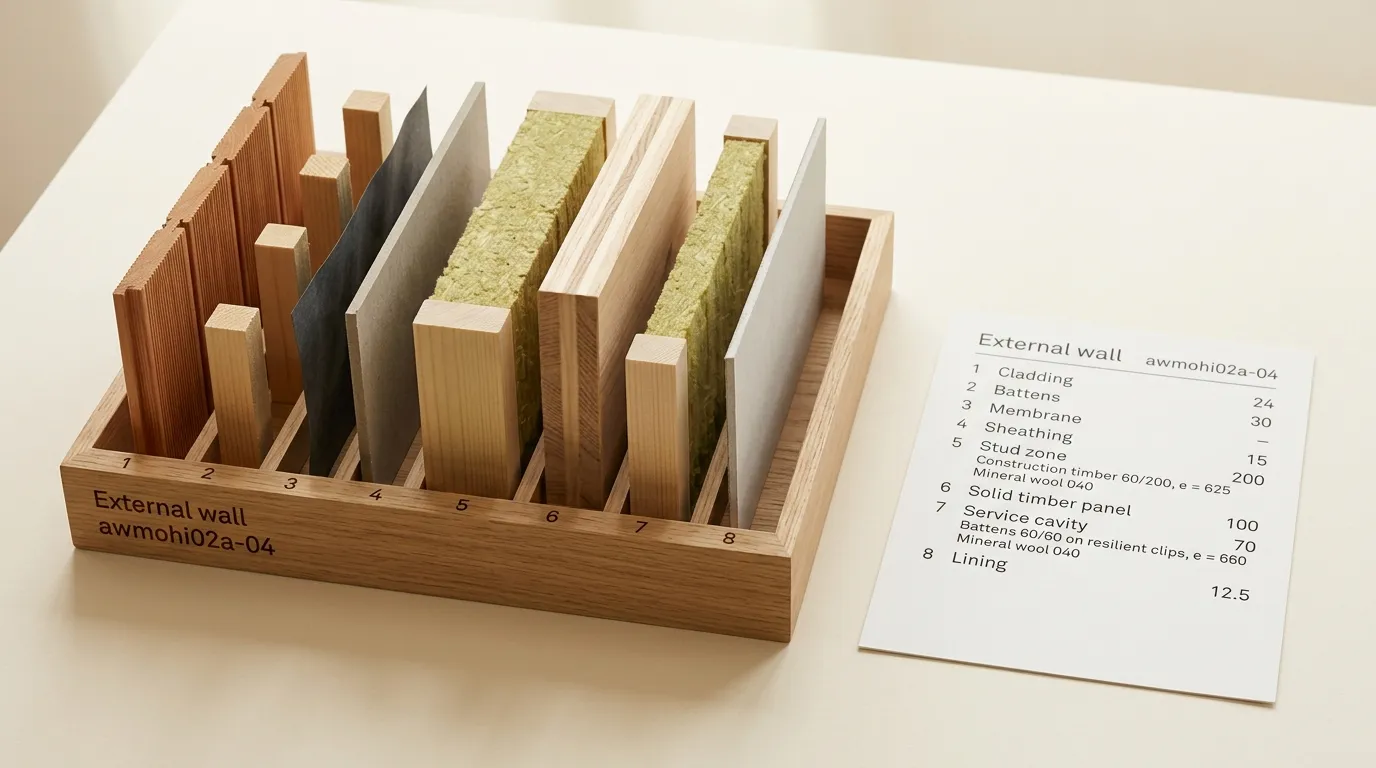
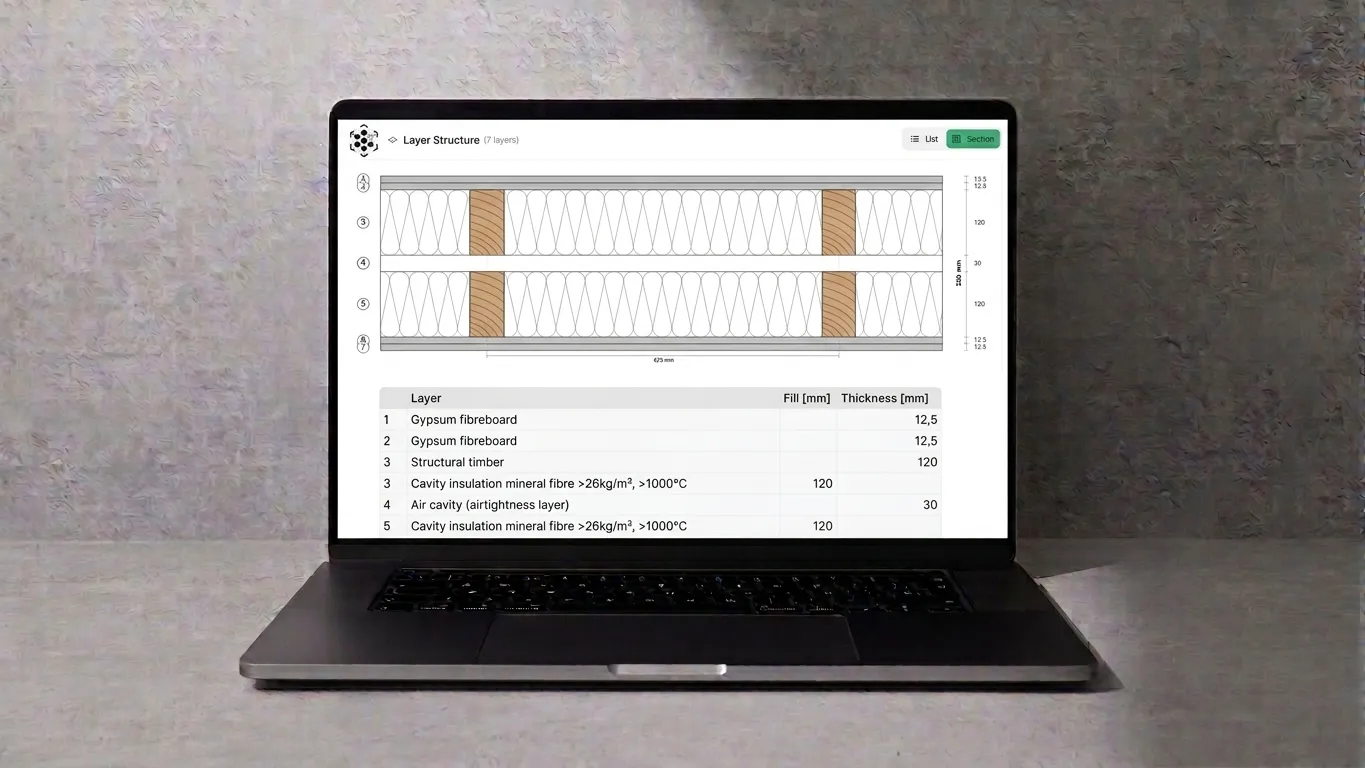
DOKwood is a research project and a software platform for the documentation of multilayer buildups in prefabricated timber construction. In a timber building, the buildup of a wall, floor or roof (the ordered stack of boards, studs, insulation and cladding) is where structural, fire, acoustic, thermal and cost decisions meet. Today that information lives in PDFs and spreadsheets that are re-typed at every step from tender to workshop. DOKwood gives buildups a home: a web platform where a company defines its buildups once, verifies them against requirements, versions them like code, and hands them to the tools downstream without re-entering data.
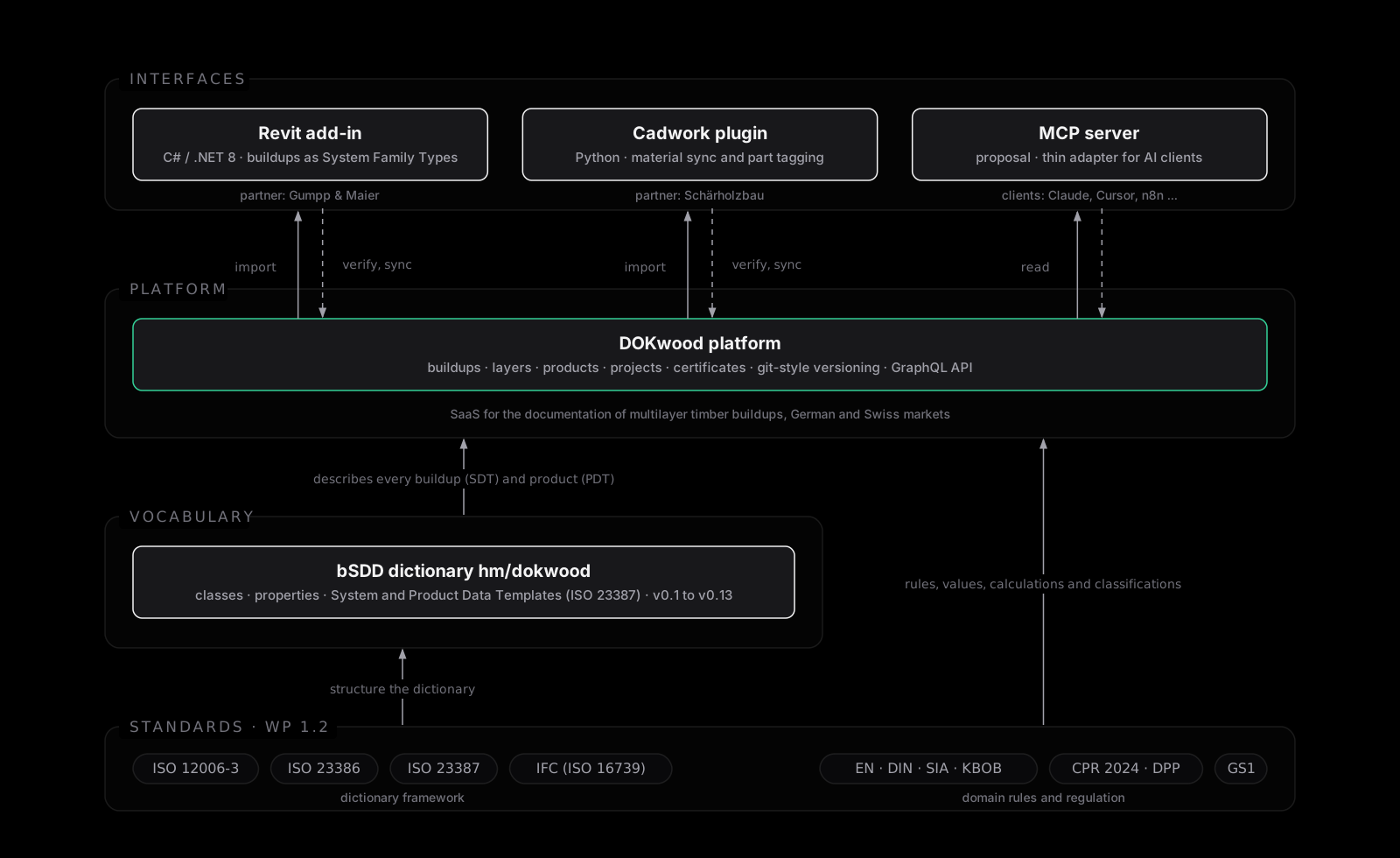
The project is funded by ZIM (Germany) and Innosuisse (Switzerland) under the IraSME programme. The consortium pairs a university with a timber contractor in each country: Hochschule München with Gumpp & Maier, and Berner Fachhochschule with Schärholzbau. I joined the project as a research associate at Hochschule München from February 2025 to June 2026. My work focused on the parts that make the platform interoperable: the standards it builds on, the data dictionary that gives its terms a shared meaning, and the interfaces to the tools timber builders already use.
Standards review
The first deliverable was a systematic review of the standards that govern how materials and buildups are specified in timber construction in Germany and Switzerland: ISO and GS1 at the international level, CEN and the harmonised EN standards in Europe, DIN, VDI and the Muster-Holzbau-Richtlinie in Germany, SIA, KBOB and VKF in Switzerland. It covers fire, acoustics, building physics, structural design, technical drawings, BIM, and the incoming Digital Product Passport under the 2024 Construction Products Regulation. Its practical output was a mapping of the partners’ internal terminology to governed standard terms and a proposed shared vocabulary. You can read more about this study on my dedicated standards for timber construction specifications page.

buildingSMART Data Dictionary (bSDD)
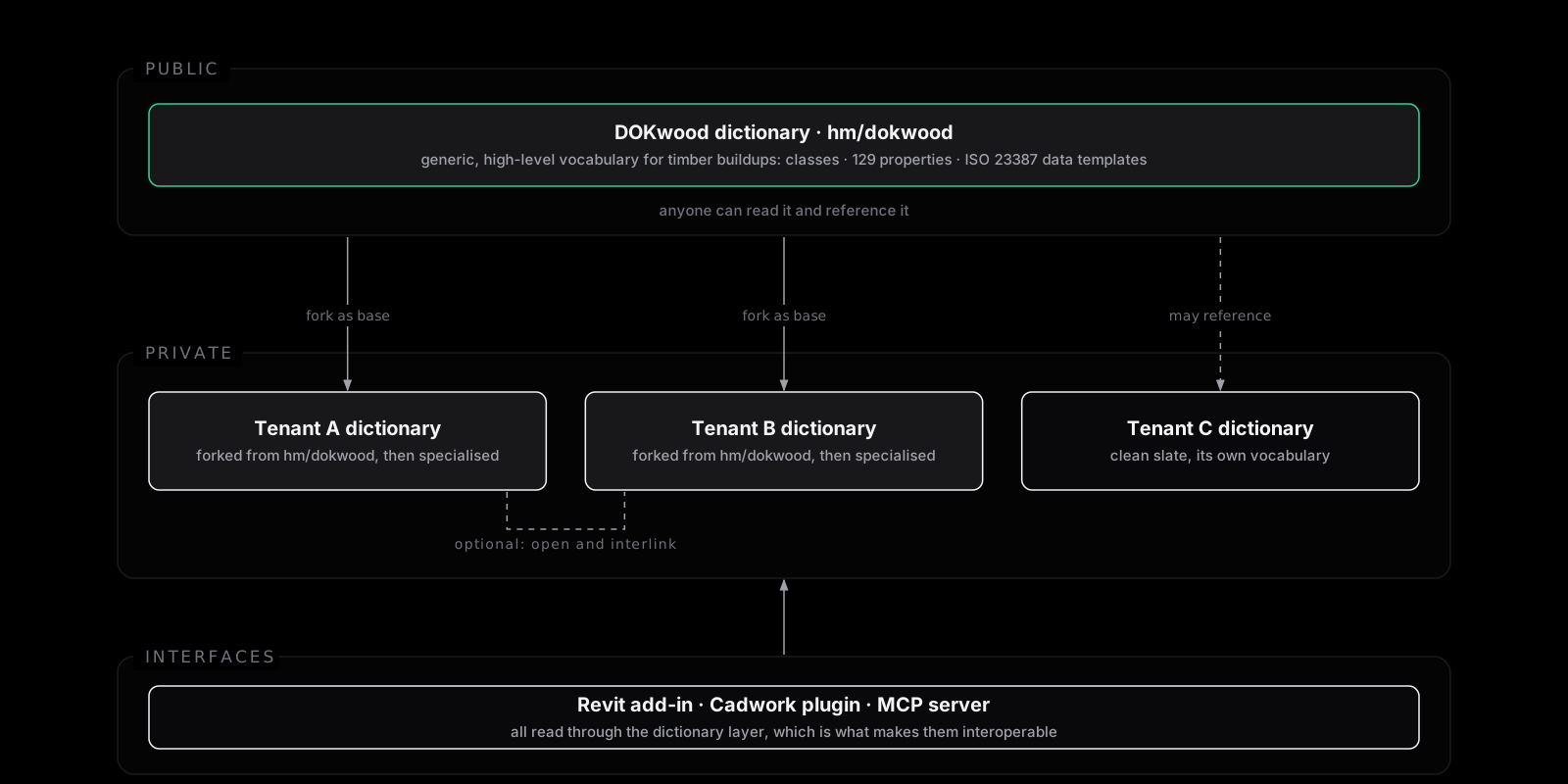
The shared vocabulary proposed in the standards review became a dictionary in the buildingSMART Data Dictionary (bSDD), hm/dokwood, versioned from v0.1 to v0.13. It defines the classes (Buildup, Wall, Roof, Slab, Product), 129 properties and their groups, and follows ISO 23387 data templates: a System Data Template for a buildup, a Product Data Template for a product, and a HasPart composition that links them.
The role of that dictionary in the platform is worth spelling out, because it is what turns DOKwood from a tool into a framework. Data dictionaries sit at two levels. The bSDD dictionary is the public, generic, high-level one: a common vocabulary for timber buildups that anyone can read and reference. Inside the app, each tenant (one timber company) owns its own data dictionary, which is private: its own classes, properties, templates and requirements, shaped by its products, its national standards and its workflow. A new tenant can fork the DOKwood bSDD dictionary as the base for its private dictionary and specialise it from there, or start from a clean slate and bring its own vocabulary. DOKwood therefore does not prescribe one dictionary for everyone; it provides the framework in which dictionaries are defined, versioned and used, plus a well-founded public starting point. Because a tenant dictionary can reference the public one, the same architecture also lets a tenant open its dictionary later and interlink it with other companies’ dictionaries, so that two partners can exchange buildups and products against a shared vocabulary rather than a bilateral mapping.
Every interface below reads through this dictionary layer, which is what makes them interoperable. The design, the build pipeline and the road to a DPP-ready export are on the data model for timber buildups page.
Revit add-in
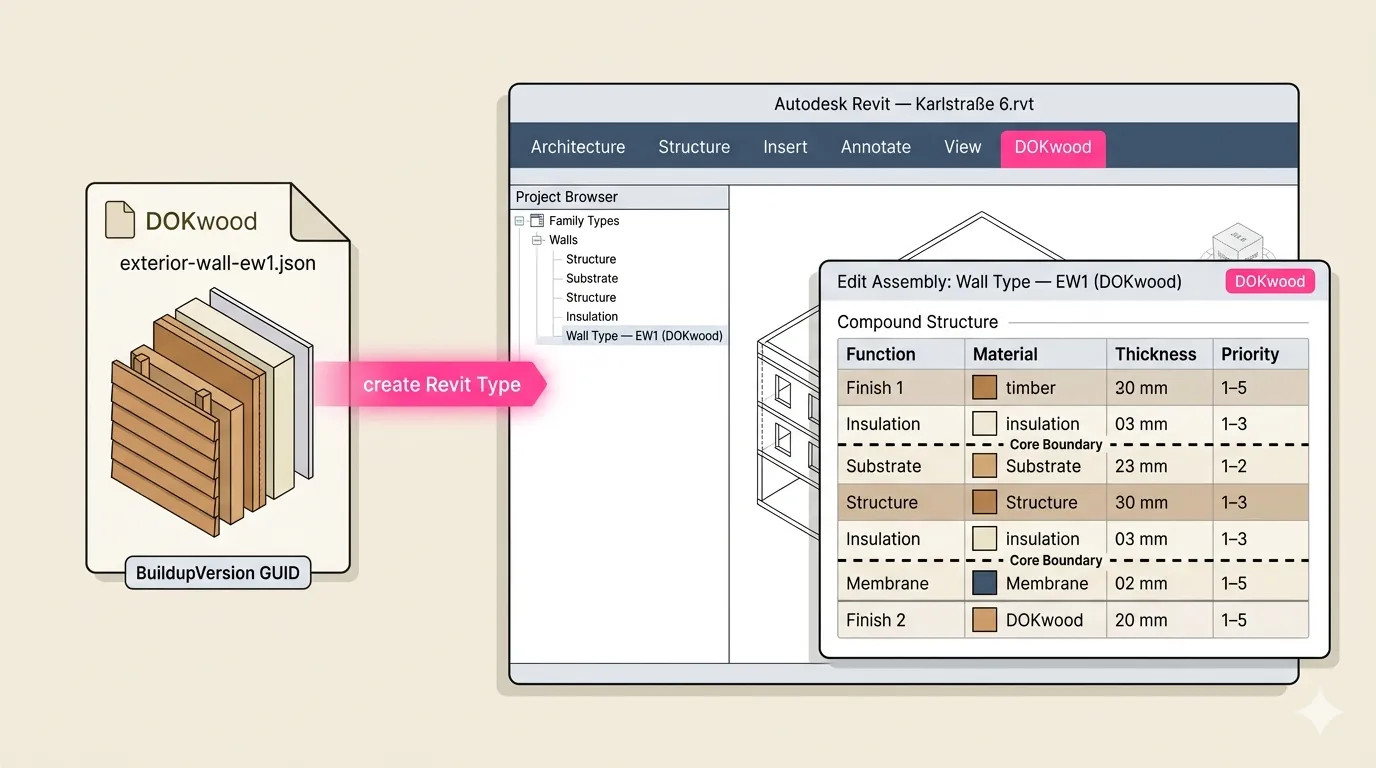
For Gumpp & Maier I built a Revit 2026 add-in in C# and .NET 8 that imports a DOKwood buildup as a ready-to-use System Family Type: it picks the host category from the IFC entity the bSDD class maps to, builds the compound structure through the Revit API, and applies layer function, thickness, conductivity, colour and core-layer flags. The context matters: Gumpp & Maier’s cost estimation runs from a company Revit template through a GAEB export into Nevaris, and the template’s material names are what the quantity takeoff keys on. The add-in therefore has to align with the existing named materials rather than inject new ones, and the main roadmap item that came out of the partner workshops is a two-way sync of the Revit material database with the platform as the template evolves.
Cadwork plugin
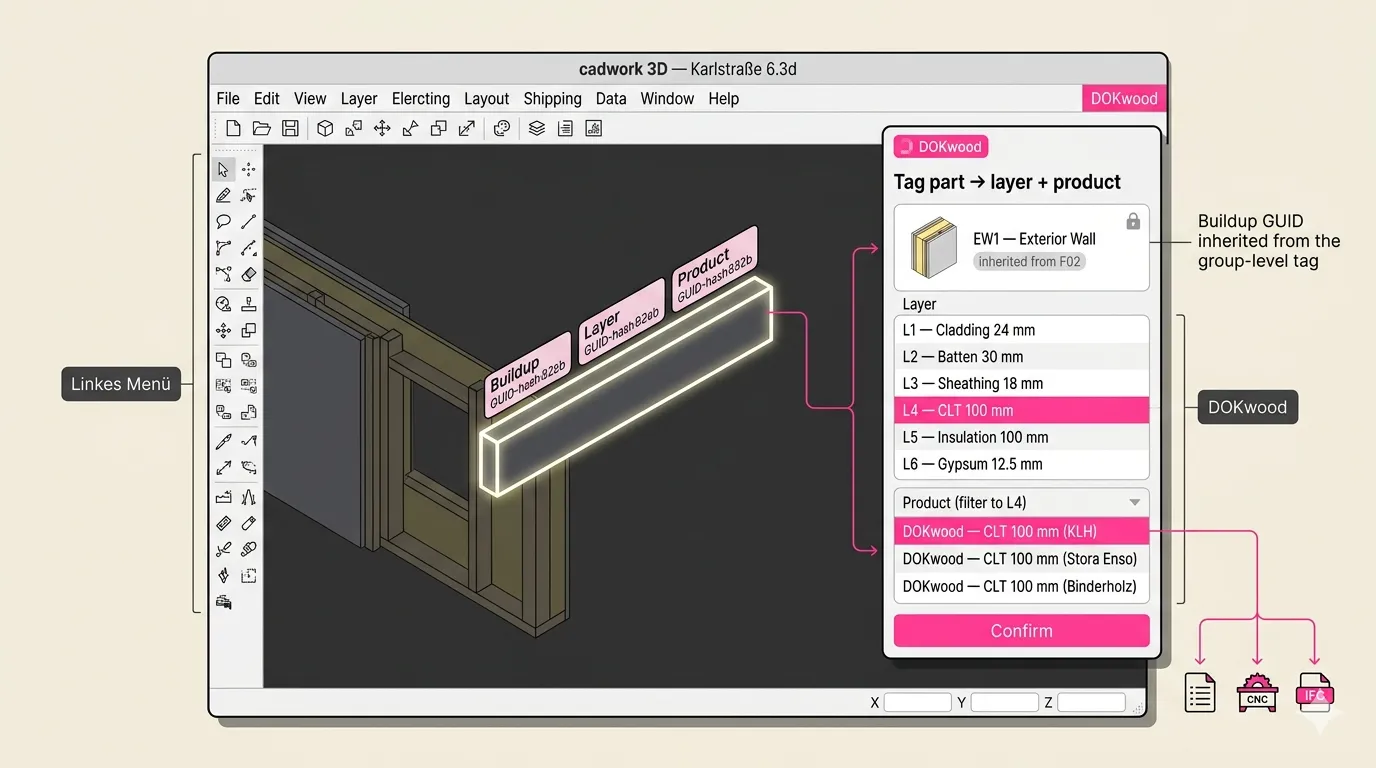
For Schärholzbau I built the first feature of a Cadwork 25 plugin in Python on the cwapi3d API: login, tenant and product selection, and import of DOKwood products with their bSDD properties as Cadwork materials, idempotent across re-imports. The decisive finding from the partner meetings was that Schärholzbau does not use Cadwork’s multi-layer-cover module; they model buildups part by part. So the plugin pivoted from driving that module to two things that fit their workflow: keep the material catalogue in sync, and tag each part with the DOKwood buildup, layer and product GUIDs so the production model can be validated against the specification before it goes to the saw. The architecture is strictly layered, with only two files touching the Cadwork API, and 48 unit tests cover the rest.
MCP server proposal
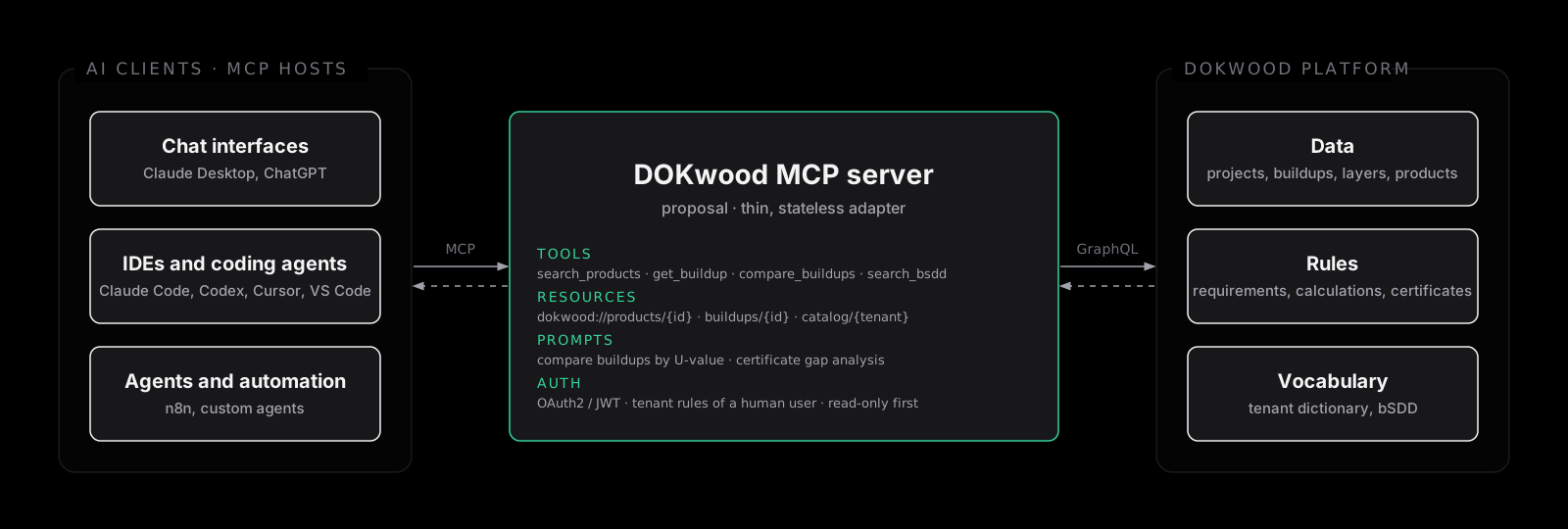
The last piece is a proposal, reviewed but not yet built, for a Model Context Protocol server in front of the platform: a thin, stateless adapter that translates MCP tools, resources and prompts into authenticated GraphQL calls, so an AI assistant can search products, compare buildups or run a certificate gap check under the same tenant rules as a human user. Strategically it replaces the original plan of one bespoke ERP connector per partner with one standards-based interface that any MCP-aware tool can use. The reviewer’s main open question, whether write access belongs in MCP at all, shapes the roadmap: start read-only, and treat writes as a separate decision.
Other Links