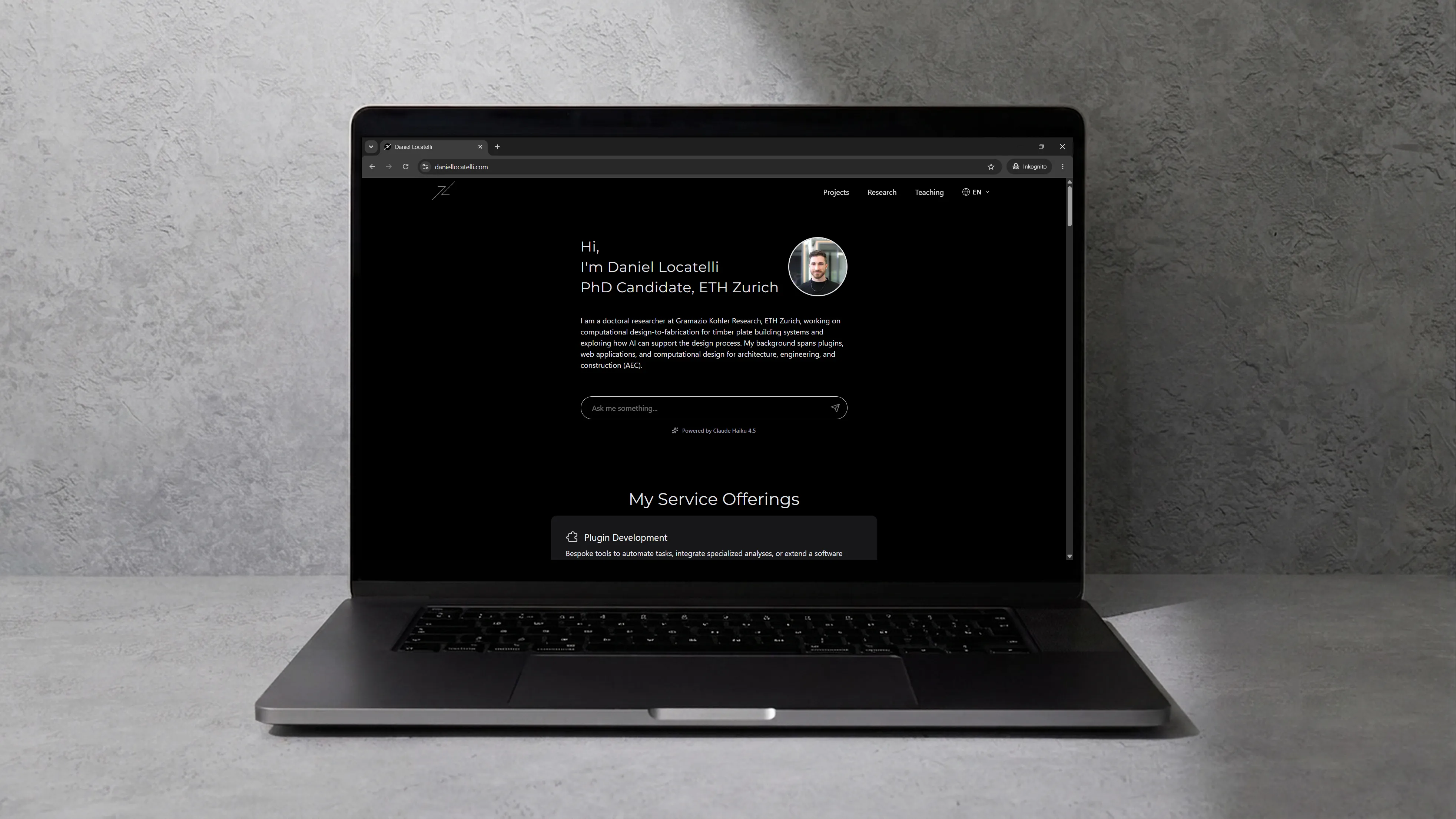
Portfolio Website
| Date | |
|---|---|
| Last updated | |
| Organization | Daniel Locatelli |
| Place | Online |
| Link | daniellocatelli.com |
This is the website you are reading right now. It started in April 2024 as a small Astro site and has since grown into a playground for the way I like to build things: fast static pages, content that is easy for both humans and AI tools to read, and a few interactive pieces to spice things up.
Tech Stack
- Astro with TypeScript for the site itself, React for the few islands that need interactivity, and Tailwind CSS for styling.
- Astro Content Collections for all content, written as markdown and MDX with typed frontmatter and validated at build time.
- Claude (Anthropic) for the homepage chat, with Supabase as a vector store for retrieval.
- Three.js for the geodesic sphere.
- Cloudflare Workers with Static Assets for hosting, edge caching, and the agent-facing endpoints; prerendered pages are served straight from the edge, and the Worker only runs for the chat and MCP endpoints.
Claude Code as content management system
All the content lives as plain text files (written in markdown) in the same place as the code, the public repository on GitHub: one small file per project, research entry, publication, teaching item, or CV section, with a short header that holds the facts (title, dates, tags) above the text of the page, and a copy in each of the three languages. There is no database and no separate content system behind the pages.
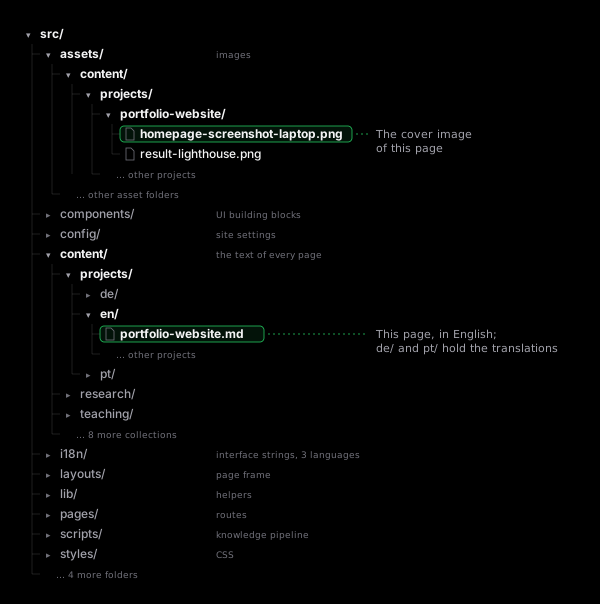
The point of this setup is to make the content directly accessible to AI harnesses such as Claude Code. Because the content is just files next to the code, Claude Code can read, edit, create, and cross-check entries the same way it works on source code. In practice this means I use Claude Code as the content management system (CMS), the tool you would normally log into to add a page or fix a typo: I describe a new project or a correction in a sentence, and it writes or updates the files, keeps the headers consistent, and checks the related entries in the other languages. This very page was written that way. Everything on this site is co-created, from the code to the content.
Keeping the content in the repository as plain text has a second payoff: it is straightforward to chunk it, embed it, and feed it to a language model. That is what makes the AI chat on the homepage possible (more on it below).
Translation by Claude Code
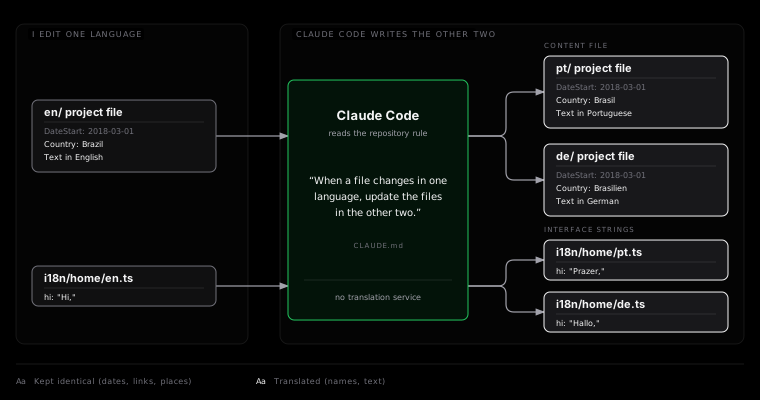
The site is available in English, Portuguese, and German. There is no translation service in the pipeline: when a content file changes in one locale, Claude Code translates it and updates the corresponding files in the other two. Structural fields such as dates, links, and places are kept in sync, while translatable fields such as country and city names are localised. The same applies to the interface strings, which live as typed objects per locale.
AI chat on the homepage
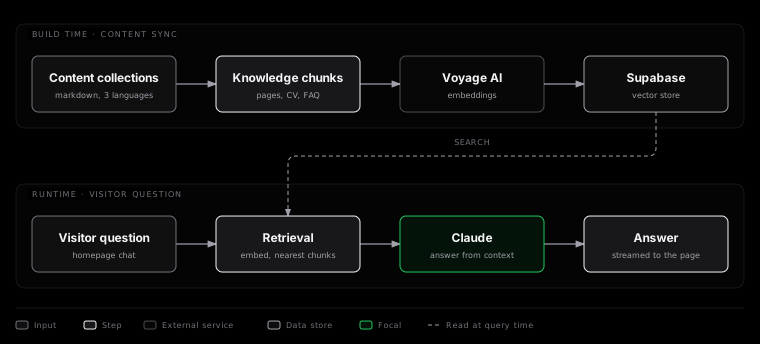
The homepage opens with a chat powered by Claude. Visitors can ask what I am working on, where I studied, which tools I use, or anything else covered by the site, and get an answer grounded in the actual content rather than a generic reply.

Under the hood, a knowledge pipeline turns the content collections into small text chunks per locale (individual pages, CV entries, a chronological timeline, and a set of pre-written FAQ answers for the most common visitor questions), embeds them with Voyage AI, and stores the vectors in Supabase. When a question comes in, the API endpoint retrieves the most similar chunks and passes them to Claude as context. Whenever content changes, a single command regenerates the knowledge files and uploads fresh embeddings, and a benchmark script runs a fixed set of common questions against the chat to make sure it still answers all of them correctly.
The geodesic sphere
Further down the home page, between the service offerings and the “Architect + Programmer” section, sits a geodesic sphere rendered with Three.js. It follows the construction Buckminster Fuller made famous: start from an icosahedron, subdivide each face, project the vertices onto a sphere, and take the dual, so that the twelve original vertices become pentagons and everything else becomes hexagons. The sphere rotates as you scroll, tying the motion of the page to the geometry. The green polygon edges are drawn as thin screen-space strips rather than raw one-pixel GL lines, so they stay smooth and evenly thick on any screen, and the faces are nudged back slightly in depth so the edges never flicker against the surface. A light fog toward the black page background fades the faces at the back of the sphere, giving the view a sense of depth.
It is also a nod to my own path: geodesic and lightweight structures are a recurring theme in the projects and research on this site, from the O3 Pavilion, where it started for real, through Common Sky and my master thesis Building Across Scales to my doctoral work on timber structures. Three.js is fetched right after the first screen has painted, in an idle moment, so it never sits on the critical path of the initial page load but is ready by the time you scroll down to the sphere.
Presentation mode
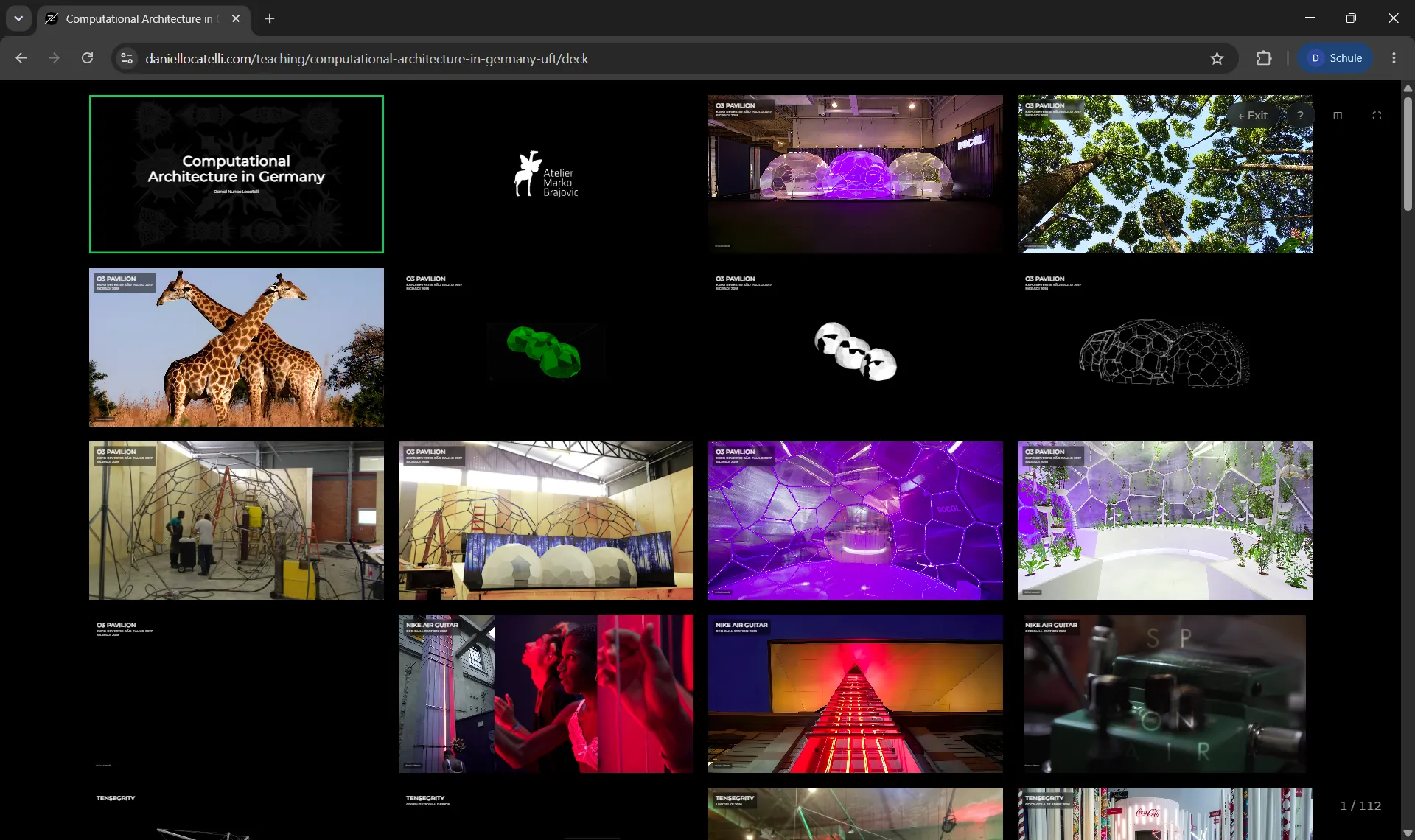
Content items can carry a slide deck that lives alongside the writeup, in the same folder and the same repository. Decks are authored in MDX with a small YAML shorthand for the common slide types (title, text, image, image row, video, overlays), and rendered in the browser with keyboard navigation, an overview of all slides, and a presenter window. I use this for teaching and talks, so that a lecture and its slides are published together, versioned together, and translated together.
Agent-ready on Cloudflare
Since much of the traffic to a site like this will increasingly come from AI agents rather than browsers, the site exposes its content in the formats agents expect:
- an
llms.txtindex per locale, generated from the content collections at build time; - a markdown companion for every content page (append
.mdto the URL), plus content negotiation so that a request withAccept: text/markdownreceives markdown directly; - a
robots.txtthat explicitly welcomes AI crawlers, a sitemap with image entries and per-URLlastmoddates taken from git history (the same date appears as “Last updated” on every content page and asarticle:modified_timeanddateModifiedstructured data in its head), and an API catalog under/.well-known/; - a small read-only MCP server, so that agents can query the site’s content as tools;
- DNS-AID discovery records (
_mcp._agentsand_index._agentsSVCB records, DNSSEC-signed), so that agents can find the MCP endpoint from the domain name alone; - a skills index under
/.well-known/agent-skills/, following Cloudflare’s Agent Skills discovery RFC, with twoSKILL.mdfiles in the Agent Skills format that teach an agent how to query the site via MCP or read it as markdown.
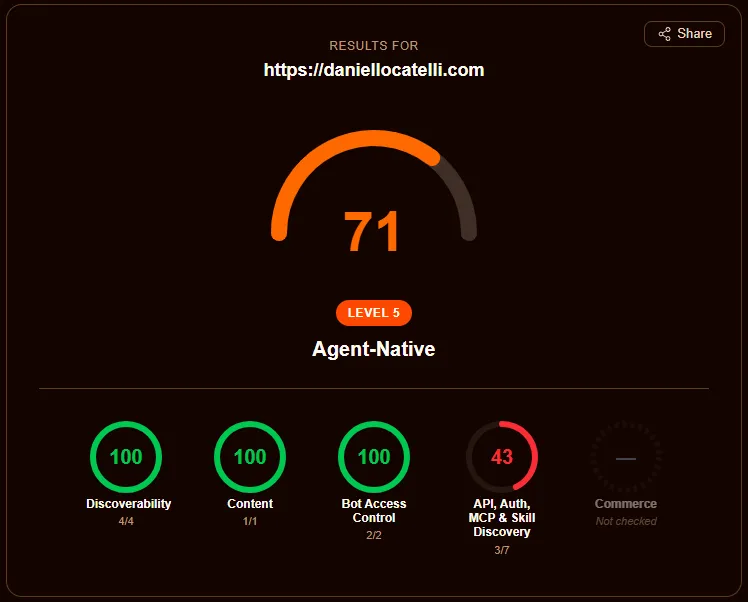
Getting content negotiation to work on prerendered pages took some digging into how Cloudflare’s request pipeline, Workers Static Assets, and Astro’s build-time middleware interact; the solution is a zone-level Cloudflare Snippet that rewrites the URL before it reaches the Worker. On isitagentready.com, the checker that accompanies Cloudflare’s agent-readiness guide, the site went from a 25% score to 71/100, “Level 5, Agent-Native”, with full marks for discoverability, content, and bot access control. The remaining points sit in the API and auth category and are deliberately left open: OAuth discovery, protected-resource metadata, and an auth.md only make sense when there is something to log in to, an A2A agent card describes an agent that offers services to other agents, and WebMCP exposes in-page actions such as forms or checkouts. A read-only portfolio has none of these, so the checker keeps listing them and the site keeps declining them.
Performance and Lighthouse
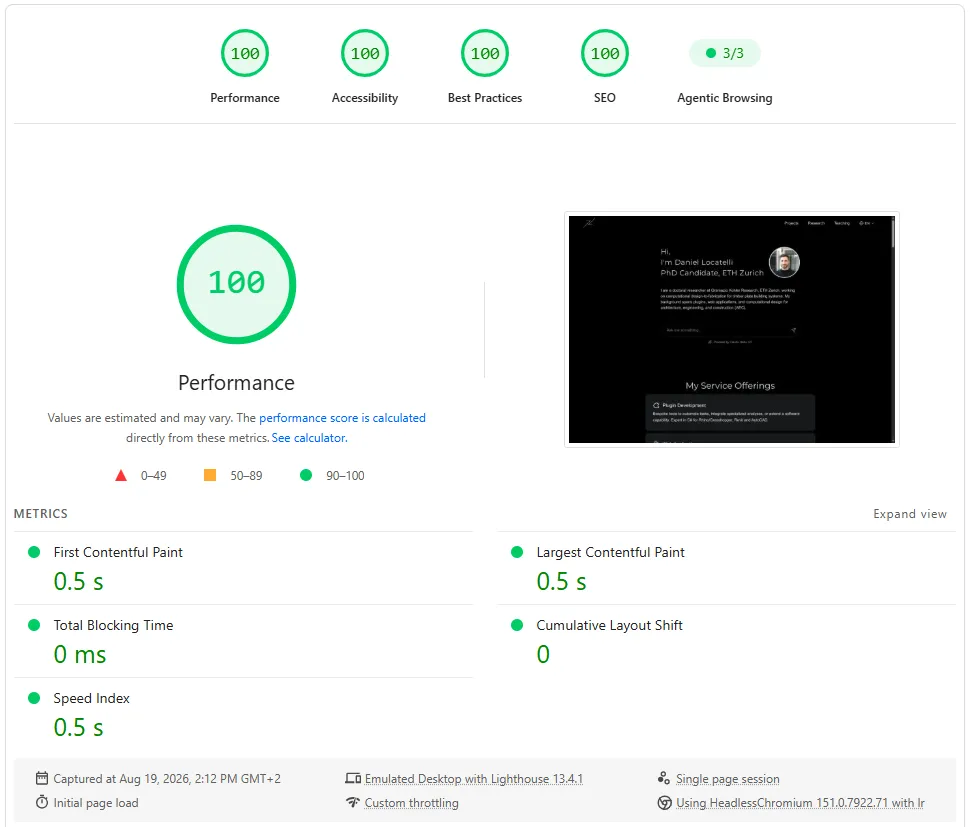
Astro renders the site to mostly static HTML, which already gives it a head start. Lighthouse scores of 100 for performance, accessibility, best practices, and SEO then come from not loading what the visitor does not need yet:
- Images ship in responsive sizes with explicit dimensions, lazy-loaded just ahead of the viewport; fonts are subset and preloaded.
- Three.js loads during an idle moment and only redraws the sphere while it is moving.
- The chat window is fetched only once a visitor starts typing, so the hero input itself ships a few kilobytes of JavaScript.
- The skills-map logos are separate lazy-loaded images instead of inline SVG, which cut the homepage HTML from about 350 KB to under 70 KB.
A personal toolbox behind the public pages
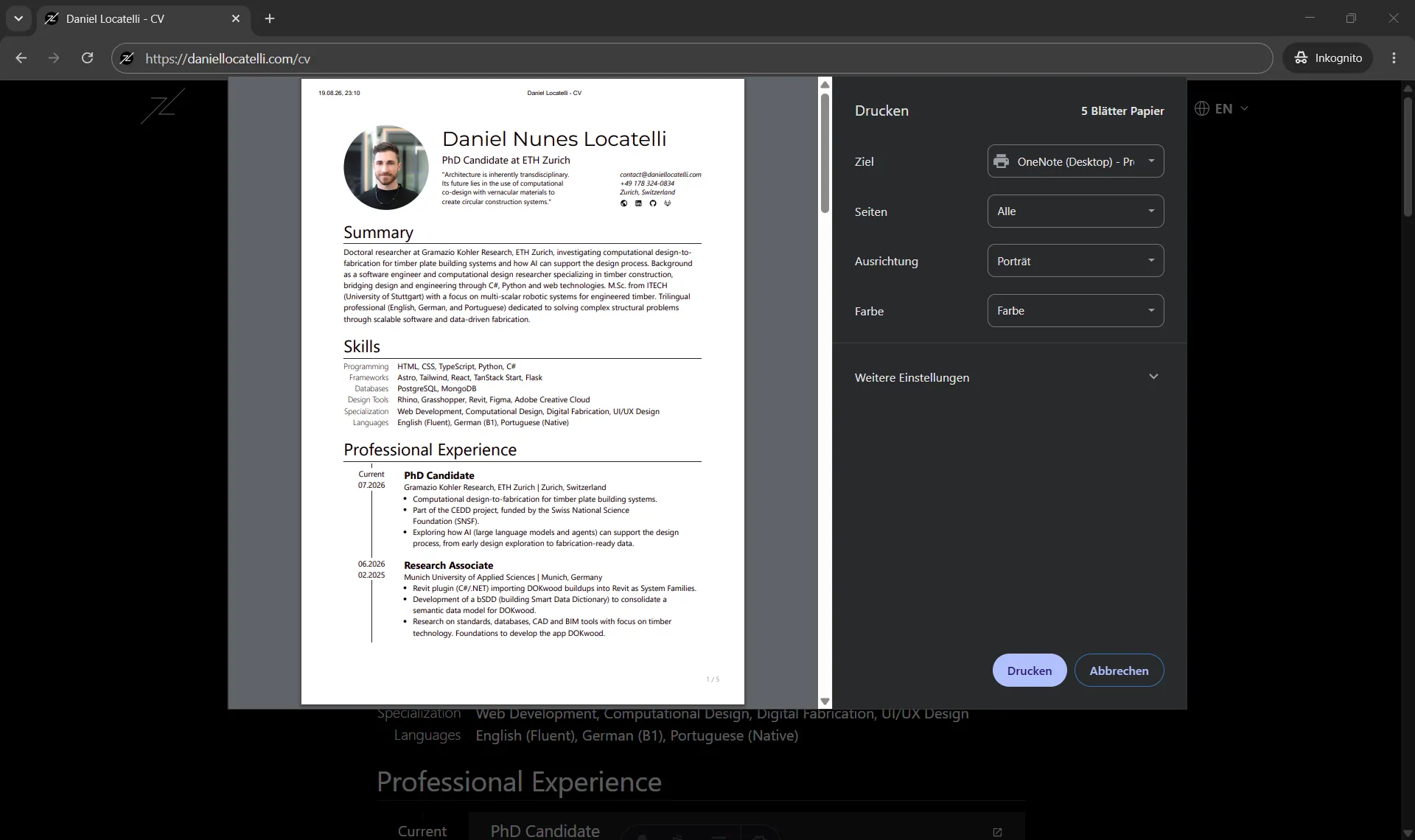
The site also hosts pages that are not linked from anywhere and exist mainly for my own use. The short CV, the full CV, and the PhD-oriented CV live at unlisted URLs, are rendered from the same content collections as the rest of the site (so an experience or publication only ever needs to be entered once), and carry print styles so that saving the page as a PDF produces a clean, up-to-date document whenever one is needed. A couple of similarly unlisted pages serve as title cards for recorded lectures. In this way the site doubles as a small workspace, not only a showcase for visitors.
Smaller details
- Link previews at build time. External links listed on a page are rendered as preview cards. Their titles, descriptions, images, and favicons are fetched once and cached in the repository, so the build is reproducible and no third-party request happens at page load.
- No broken links. Every link on the site, to its own pages, to the files each page loads, and to the icons and footnotes each page points at inside itself, is checked against the finished build, so nothing broken gets deployed. Links to other sites are swept once a week and reported, since those break on their own schedule.
- Tooltips everywhere. One small tooltip system (a popover panel with an arrow, positioned and flipped by a few lines of JavaScript) serves every tooltip on the site: markdown footnotes show the note inline on hover so readers do not have to jump to the bottom of the page; each tool in the homepage Map of Knowledge explains where and how I use it; the social icons in the footer, the contact section and the CV header name their destination; and the slide-deck controls show their keyboard shortcut. No native browser tooltips remain.
Other Links

'%3e%3cpath%20d='M198.241%20121.052C197.463%20121.052%20196.696%20121.081%20195.93%20121.105C195.806%20121.113%20195.684%20121.141%20195.569%20121.189C195.366%20121.258%20195.184%20121.377%20195.038%20121.534C194.892%20121.692%20194.788%20121.883%20194.734%20122.09L191.447%20133.576C190.03%20138.514%20190.557%20143.074%20192.94%20146.421C195.123%20149.519%20198.756%20151.336%20203.169%20151.548L221.002%20152.629C221.532%20152.657%20221.991%20152.911%20222.27%20153.333C222.567%20153.787%20222.633%20154.355%20222.452%20154.867C222.307%20155.277%20222.049%20155.637%20221.706%20155.904C221.363%20156.171%20220.951%20156.333%20220.518%20156.373L201.987%20157.454C191.921%20157.921%20181.089%20166.136%20177.289%20176.154L175.954%20179.689C175.897%20179.836%20175.875%20179.994%20175.891%20180.15C175.907%20180.306%20175.96%20180.457%20176.046%20180.589C176.132%20180.72%20176.247%20180.83%20176.384%20180.908C176.52%20180.986%20176.673%20181.031%20176.83%20181.038H240.648C241.02%20181.04%20241.381%20180.92%20241.677%20180.697C241.974%20180.473%20242.189%20180.159%20242.289%20179.802C243.421%20175.727%20243.992%20171.517%20243.985%20167.288C243.985%20141.767%20223.522%20121.081%20198.269%20121.081'%20fill='%23E69432'/%3e%3cpath%20d='M170.387%20179.554L171.567%20175.401C172.988%20170.463%20172.461%20165.902%20170.082%20162.556C167.891%20159.457%20164.26%20157.64%20159.846%20157.429L76.193%20156.348C75.9326%20156.343%2075.6769%20156.277%2075.4471%20156.154C75.2172%20156.032%2075.0196%20155.857%2074.8705%20155.643C74.7244%20155.419%2074.6319%20155.164%2074.6001%20154.898C74.5684%20154.632%2074.5982%20154.362%2074.6874%20154.11C74.8328%20153.697%2075.0943%20153.336%2075.4403%20153.069C75.7864%20152.802%2076.2024%20152.64%2076.638%20152.604L161.073%20151.522C171.097%20151.059%20181.927%20142.841%20185.727%20132.823L190.543%20120.098C190.738%20119.558%20190.787%20118.976%20190.683%20118.412C185.198%2093.5897%20163.253%2075%20137.017%2075C112.832%2075%2092.3123%2090.7729%2084.9477%20112.699C79.9906%20108.931%2073.7831%20107.195%2067.5903%20107.844C55.9962%20109.011%2046.664%20118.455%2045.512%20130.178C45.2155%20133.105%2045.4309%20136.062%2046.1486%20138.916C27.1997%20139.477%2012%20155.167%2012%20174.446C12%20176.189%2012.1239%20177.906%2012.3746%20179.582C12.4775%20180.395%2013.1704%20181.005%2013.9901%20181.003H168.477C168.912%20180.996%20169.334%20180.849%20169.678%20180.582C170.022%20180.315%20170.271%20179.944%20170.387%20179.524'%20fill='%23DE6225'/%3e%3c/g%3e%3cdefs%3e%3cclipPath%20id='clip0_353_19060'%3e%3crect%20width='232'%20height='106'%20fill='white'%20transform='translate(12%2075)'/%3e%3c/clipPath%3e%3c/defs%3e%3c/svg%3e)

%20{%20rect%20{%20fill:%20%23171717;%20}%20path%20{%20stroke:%20%23fafafa;%20}%20}%20@media%20(prefers-color-scheme:%20dark)%20{%20rect%20{%20fill:%20%23fafafa;%20}%20path%20{%20stroke:%20%23171717;%20}%20}%20%3c/style%3e%3c/svg%3e)